
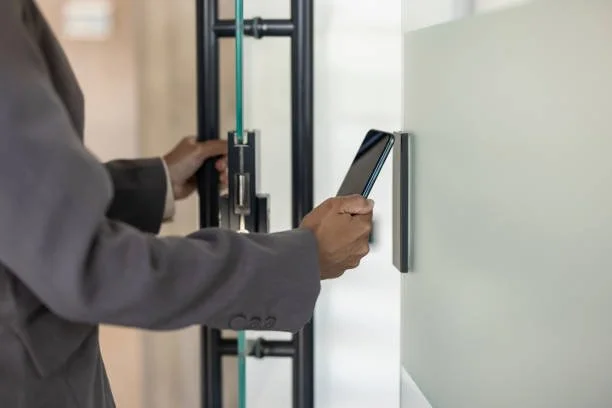
Mobile access control is changing how businesses manage entry, protect facilities, and authorize employees. By using smartphones as digital keys, companies can replace traditional access cards with secure, convenient entry methods. Mobile access control installation allows authorized users to unlock doors through smartphone applications, encrypted digital credentials, or compatible mobile devices. This technology improves convenience, supports touchless entry, and gives administrators greater control over building access. For modern businesses, it offers a practical way to strengthen security while simplifying daily operations. Maxemum Security helps commercial organizations implement security solutions that align with their facility requirements, operational needs, and access management goals.
What Is Mobile Access Control?
Mobile access control is an electronic security system that uses mobile devices, such as smartphones or smartwatches, to grant authorized access to buildings, offices, restricted areas, and other secured locations. Instead of carrying a physical access card or key fob, employees use digital credentials stored on their devices.
The system communicates with an electronic door reader through technologies such as Bluetooth Low Energy (BLE), Near Field Communication (NFC), or secure internet-connected platforms. When an authorized user presents a valid credential, the reader verifies the permission and unlocks the door.
A typical smartphone access control system includes:
Mobile credentials: Digital keys assigned to authorized employees or visitors.
Electronic door readers: Devices that verify mobile credentials before granting entry.
Access control software: A platform for managing users, permissions, and entry records.
Electronic locks: Hardware that secures doors and releases them after authorization.
Network infrastructure: Communication components connecting readers and management systems.
These components work together to create a controlled entry environment without relying entirely on physical keys or access cards.
Why Businesses Are Moving Toward Smartphone Access Control
Traditional access cards remain useful, but they create administrative challenges. Employees can lose cards, forget them at home, or share them with unauthorized individuals. Replacing cards also requires time and resources.
Smartphone access control addresses many of these issues by placing credentials on devices employees already carry. Businesses can issue access permissions digitally and manage them through a centralized platform.
Several factors are encouraging organizations to adopt mobile credentials:
Employees can use their smartphones instead of carrying separate access cards.
Administrators can issue or revoke credentials remotely.
Access permissions can be adjusted according to job roles and schedules.
Digital entry records support security reviews and operational monitoring.
Touchless entry reduces the need to physically interact with door readers.
For offices, commercial buildings, healthcare facilities, warehouses, and other business environments, these advantages can simplify access management while maintaining appropriate security controls.
Key Benefits of Mobile Access Control for Businesses
Convenience, administrative control, and security are the primary advantages.
1. Convenient Entry With Digital Credentials
Employees no longer need to search for an access card or carry an additional key fob. A smartphone can serve as a digital credential for approved doors and entry points.
Depending on the system, users may unlock doors by tapping their phones against a reader, presenting a credential through Bluetooth, or using a secure mobile application.
This convenience can be valuable in workplaces where employees move frequently between offices, meeting rooms, storage areas, and secured departments.
2. Improved Security Through Permission Management
Mobile access control enables administrators to assign permissions based on employee roles, departments, schedules, and authorized locations.
For example, an employee working in accounting may receive access to the main office and finance department, while a warehouse supervisor may be authorized to enter storage and loading areas.
If an employee leaves the organization or changes roles, administrators can revoke or modify digital credentials without collecting a physical card.
This helps reduce unauthorized access and supports more accurate permission management.
3. Touchless Entry for Workplace Convenience
Touchless entry allows users to gain access without physically touching a door reader. Bluetooth-enabled systems can detect an authorized smartphone within a configured range, while NFC-based systems generally require the user to bring the device close to the reader.
Touchless entry can be helpful in:
Office buildings with frequent employee movement
Healthcare facilities with controlled access areas
Commercial spaces with visitor traffic
Warehouses with employees carrying equipment
Shared workspaces with multiple authorized users
The specific entry method depends on the reader, mobile device, and system configuration.
4. Faster Credential Issuance and Revocation
Traditional access cards must be printed, programmed, distributed, and collected. Mobile credentials can often be issued through an access management platform.
Administrators can assign access to new employees, contractors, or approved visitors without requiring a physical card.
When access is no longer needed, credentials can be disabled remotely. This is particularly useful for organizations with frequent staffing changes, temporary workers, or multiple locations.
5. Better Access Visibility and Accountability
Commercial access control systems can maintain event logs that record credential activity, including successful entries and denied access attempts.
These records help administrators review activity at secured doors, investigate unusual access patterns, and verify that permissions are being used appropriately.
Mobile credentials can also be individually assigned, improving accountability compared with shared physical keys.
However, access logs should be managed in accordance with company privacy policies and applicable data protection requirements.
How Mobile Access Control Works in a Commercial Environment
A mobile access control system follows a verification process before granting entry. The process typically involves four steps:
Credential assignment: An administrator assigns a digital credential to an employee through the access management platform.
Credential presentation: The employee uses a smartphone to interact with the door reader through Bluetooth, NFC, or another supported method.
Authorization verification: The reader or connected controller checks the credential against configured access permissions.
Door release: If authorization is successful, the electronic lock releases. The system may also record the access event.
For example, an employee arriving at an office building at 8:30 AM can use an authorized smartphone credential to enter the lobby. The same credential may allow access to the employee's assigned office area but deny entry to a server room.
This approach makes entry permissions more precise and reduces reliance on physical keys.
Mobile Access Control vs. Traditional Access Cards
Both mobile credentials and traditional access cards can provide secure building entry. The main differences involve convenience, credential administration, and device dependency.
| Feature | Mobile Access Control | Traditional Access Cards |
|---|---|---|
| Credential Type | Smartphone or compatible mobile device | Physical card or key fob |
| Credential Issuance | Often digital and remote | Usually requires card programming |
| Lost Credential Management | Digital credential can be revoked | Card must be disabled and replaced |
| Entry Method | Bluetooth, NFC, or supported mobile technology | Card presented to a reader |
| User Convenience | Uses a device employees already carry | Requires a separate credential |
| Device Dependency | Requires a compatible mobile device | Does not require a smartphone |
| Battery Dependency | Smartphone battery may affect entry | Card typically operates without a battery |
| Administrative Management | Often centralized through software | Centralized management is also available |
Mobile credentials do not automatically provide stronger security than every traditional card system. Security depends on credential encryption, reader technology, system configuration, authentication methods, and administrative practices.
Many businesses choose a hybrid system that supports mobile credentials alongside physical cards. This provides flexibility for employees, contractors, and visitors who do not have compatible smartphones.
The Role of Cloud Security in Mobile Access Control
Cloud security supports the management of mobile access control systems by allowing administrators to manage credentials, permissions, and entry activity through an internet-connected platform.
A cloud-managed commercial access control system can provide several operational advantages.
Remote Access Management
Authorized administrators can issue credentials, update permissions, or revoke access from a remote location. This can be useful for businesses managing several offices or facilities.
For example, a security manager responsible for multiple commercial properties can make access changes without visiting each building.
Centralized Administration
Cloud-based platforms can consolidate user permissions and access policies. Administrators can manage different facilities through a shared interface, depending on the platform's capabilities.
Centralized management can reduce administrative inconsistencies and improve oversight.
Software Updates and System Maintenance
Cloud platforms may support remote software updates, security patches, and system configuration changes. The availability and implementation of these features depend on the vendor and installed equipment.
Businesses should confirm how updates are delivered, how downtime is handled, and how the system operates during internet interruptions.
Data Protection and Cybersecurity
Cloud security requires careful attention to cybersecurity. Mobile access control systems should use encrypted communication, secure authentication, and appropriate administrative protections.
Recommended practices include:
Enabling multifactor authentication for administrator accounts.
Using strong, unique passwords.
Restricting administrative privileges.
Reviewing access logs regularly.
Applying software and firmware updates.
Selecting vendors with clear data protection policies.
Confirming how credentials and access records are stored.
Cloud management offers convenience, but it must be supported by proper security controls.
Practical Applications of Smartphone Access Control
Mobile access control can support different business environments based on their access requirements.
Corporate Offices
Office buildings can use mobile credentials to manage employee entry, meeting rooms, restricted departments, and shared workspaces. Temporary credentials can also be assigned to approved visitors.
Warehouses and Distribution Facilities
Warehouse operations often involve multiple entry points, loading areas, inventory rooms, and restricted zones. Mobile credentials can help assign access based on job responsibilities and work schedules.
Healthcare Facilities
Healthcare organizations can use smartphone access control to manage authorized entry into administrative offices, supply rooms, and restricted areas. Access permissions must be aligned with facility security policies and applicable privacy requirements.
Hotels and Hospitality Businesses
Mobile credentials may support staff entry into back-office areas, storage rooms, and authorized operational zones. Guest room access is a separate application that requires compatible hospitality access systems.
Multi-Tenant Commercial Buildings
Property managers can assign credentials to tenants and employees while restricting entry to shared facilities, private offices, and designated areas.
Maxemum Security can help commercial businesses evaluate access control requirements, reader compatibility, entry permissions, and integration needs as part of their broader security planning.
What Businesses Should Consider Before Implementing Mobile Access Control
Selecting the right mobile access control system requires more than choosing a smartphone-compatible door reader. Businesses should assess their facility layout, security requirements, employee needs, and existing infrastructure.
1. Smartphone and Reader Compatibility
Not every mobile credential works with every smartphone or reader. Businesses should verify compatibility with supported operating systems, Bluetooth or NFC functionality, and the selected credential platform.
2. Network Reliability
Cloud-managed systems may depend on internet connectivity for certain administrative functions. The installed system should have a clearly defined operating mode during network interruptions.
Some systems can continue validating credentials locally through door controllers, while others may have different limitations. Confirming offline functionality before installation is essential.
3. Cybersecurity Requirements
Mobile access control should include safeguards against credential theft, unauthorized account access, and insecure communication.
Businesses should review the vendor's encryption methods, authentication options, credential revocation process, and software update policy.
4. Integration With Existing Security Systems
Mobile access control may integrate with other commercial security components, including:
Intrusion detection systems
Electronic locking hardware
Visitor management platforms
Building management systems
Integration can provide better coordination between entry authorization and facility monitoring. Compatibility should be confirmed before selecting equipment.
5. Employee Adoption and Backup Entry
Employees need clear instructions for activating and using mobile credentials. Businesses should also establish backup entry procedures for situations such as a lost phone, depleted battery, or incompatible device.
A backup credential, authorized security desk process, or alternative access method can help maintain reliable entry.
Steps to Implement Mobile Access Control in a Business
A planned installation helps ensure that the system meets operational and security requirements.
Conduct a security assessment: Identify entry points, restricted areas, employee movement patterns, and existing access control equipment.
Define access permissions: Establish which employees, contractors, and visitors require access to specific locations and time periods.
Select compatible technology: Choose mobile credentials, readers, electronic locks, and management software that meet the facility's requirements.
Configure and install equipment: Install the readers, controllers, locks, and supporting infrastructure according to the system design.
Test the system: Verify credential authorization, denied access, door operation, network interruptions, and emergency procedures.
Train employees and administrators: Provide instructions for credential activation, daily entry, lost devices, and reporting access issues.
Review system performance: Audit permissions, examine access logs, and maintain software and hardware according to the vendor's recommendations.
A professional assessment can help identify compatibility issues and prevent unnecessary equipment changes during implementation.
Frequently Asked Questions About Mobile Access Control
What is mobile access control in business security?
Mobile access control is a security technology that allows authorized employees and visitors to enter secured areas using smartphones or compatible mobile devices. It replaces or supplements physical access cards with digital credentials verified by electronic readers.
Is smartphone access control more secure than key cards?
Smartphone access control can offer additional security features, such as encrypted credentials, remote revocation, and device-based authentication. However, its security depends on the technology, configuration, and management practices. A properly configured card-based system can also provide strong access protection.
Can mobile access control work without an internet connection?
Yes, some mobile access control systems can operate without an active internet connection at the door. Local controllers may validate credentials using previously configured permissions. Other functions, such as remote administration or cloud synchronization, may require connectivity. Businesses should confirm offline capabilities with the system provider.
Does mobile access control require employees to install an application?
Not always. Some systems require a dedicated mobile application, while others support credentials through a digital wallet or another approved mobile platform. The requirement depends on the access control provider and credential technology.
Can mobile access control integrate with security cameras?
Yes. Compatible commercial access control systems can integrate with video surveillance platforms. This may allow security personnel to associate door activity with camera footage, helping them review access events and investigate unauthorized entry attempts.
What happens if an employee loses a smartphone?
An administrator can generally revoke or disable the employee's mobile credential through the access management platform. The employee can then receive a replacement credential on an approved device. The exact process depends on the system and its security configuration.
Is mobile access control suitable for small businesses?
Yes. Small businesses can use mobile credentials to manage office entry, employee permissions, and restricted areas. The system should be selected based on the number of doors, security requirements, infrastructure, and ongoing management costs.
Building a More Convenient and Controlled Workplace
Mobile access control offers businesses a practical way to manage building entry while improving employee convenience and security administration. Digital credentials reduce dependence on physical access cards, simplify permission changes, and support touchless entry across commercial facilities. Cloud security capabilities can also provide centralized management and better visibility into access activity.
Successful implementation depends on selecting compatible hardware, establishing appropriate access permissions, and maintaining strong cybersecurity controls. Businesses should also plan for lost devices, network interruptions, and emergency entry requirements.
As workplace security requirements continue to change, mobile access control provides a useful option for organizations seeking more flexible entry management. Businesses evaluating their current infrastructure can schedule a consultation with us to assess their commercial access control needs and identify suitable security technologies for their facilities.
